

Introduction
I am Max Kirby, and this case study reflects on my experience conducting an unmoderated playtest for an indie game called “Save Yourself,” a puzzle-platformer developed by Marcus Jensen. (Full UX Report Here)
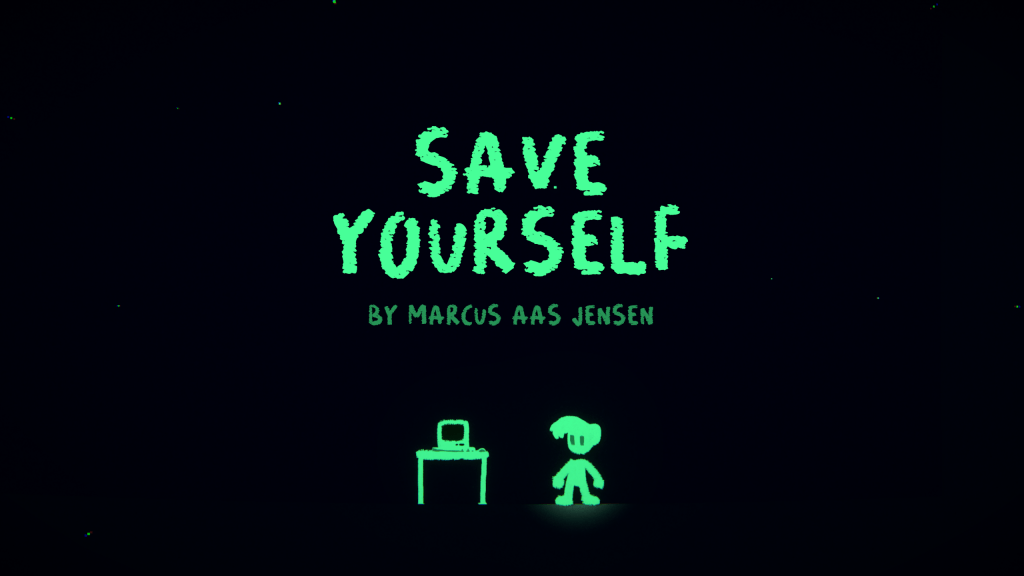
Figure 1: Starting screen of Save Yourself, showcasing its hand-drawn art style and minimalistic approach
Originally created for a game jam and now being expanded into a full game, “Save Yourself” features a unique save-and-restore mechanic blending platforming with puzzle-solving. In April 2025, I organised an unmoderated playtest to evaluate the game’s usability, user experience (UX), and player engagement, aiming to provide Marcus with actionable feedback.
This case study details my methodology, findings, recommendations, and personal reflections on the process, highlighting what I learned and how I would improve future playtests.
Methodology
Step 1: Identifying the Game and Developer Goals
To find a game for this playtest, I discovered “Save Yourself” on itch.io, a platform for indie games. On April 1, 2025, I contacted the developer, Marcus Jensen, via X (formerly Twitter) to discuss the possibility of a playtest.
I started by playing the game on my own to familiarise myself with its systems and core mechanics. This allowed me to better anticipate player interactions and focus my observations during the playtest.
Through our conversation, Marcus clarified that he wanted to target midcore to hardcore players who enjoy story-driven indie games with platforming elements, such as Undertale, Celeste, and Braid. He emphasised that the game he created uses “gaming language” to let the mechanics speak for themselves, focusing on discovery and experimentation.
In addition, Marcus shared that this playtest aligned perfectly with his long-term goals of expanding “Save Yourself” into a full game beyond its original game jam version.
He was particularly interested in testing gameplay clarity, as the game avoids overt tutorials and relies on player intuition to uncover mechanics. He also hoped to gather feedback on puzzle difficulty, control expectations, and how players interpret the atmosphere and tone. This feedback would help shape both gameplay refinements and the integration of a more developed narrative in future version.
Step 2: Designing My Study Plan
I created a detailed study plan to structure my playtest, see:
Save Yourself, Study Plan
My plan included:
● Playtest Structure: An unmoderated session where players would play for 25–30+ minutes, thinking aloud to share their thoughts, feelings, and observations.
● Recording: Gameplay and voice recordings to capture player feedback.
● Survey: A post-playtest survey with 25 questions I designed to gather detailed feedback on controls, difficulty, “Aha!” moments, story, and overall experience
● Focus Areas: I identified key areas to evaluate, including clarity of mechanics, engagement, puzzle design, “Aha!” moments, usability, and technical issues.
● Intended Moderation Table: My study plan included a table titled “During the Session”, where I outlined questions I could ask players live, such as “What kind of controls do you expect from the save and restore mechanic?” However, I later discovered that PlaytestCloud does not yet support moderated playtests for PC games, so I had to proceed with an unmoderated format instead.
While I initially intended to conduct a moderated playtest to observe player behaviour in real-time and ask clarifying questions during gameplay, I chose to proceed with an unmoderated format due to platform limitations.
This method offered key advantages: it let players interact with the game naturally, reflecting typical behaviour without outside influence. Combined with voice commentary and surveys, it captured authentic reactions and aligned well with the game’s discovery-driven design.
Step 3: Conducting My Playtest
I partnered with PlaytestCloud to execute my playtest, using their service to select six players matching Marcus’s target audience: midcore to hardcore players of solo indie games. We agreed on a balanced mix of three male and three female participants to support equality and diversity. I submitted the request on April 4, 2025, and received the footage two days later. Each player’s session was recorded, capturing gameplay and think-aloud commentary as per my study plan.
Step 4: My Data Analysis Process
I personally analysed the playtest footage using a multi-step approach:
● Annotating Videos: I watched each video and noted key moments of confusion, frustration, engagement, and insight, to understand the player’s real-time experience and pain points.
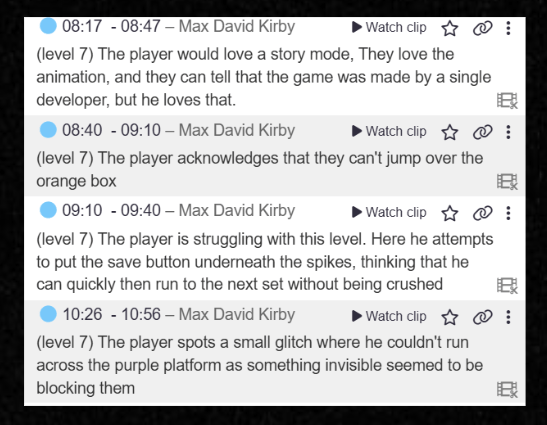
Figure 2: Playtest notes on Level 7, highlighting player feedback and an invisible wall glitch
● Timing Levels: I recorded the time each player took to complete each level, then calculated averages in a Google Spreadsheet, because in a puzzle-platformer like this, all levels are roughly equal in length when solved efficiently, so timing reveals where players get stuck.
● Organising Feedback:I used Miro to categorise my observations into themed sticky notes (e.g., Controls, Puzzle Design, Bugs, Story) and colour-coded them by severity (Positive, Critical, Serious, Medium, Low), to structure my findings visually and prioritise issues effectively.(see attached Miro board).
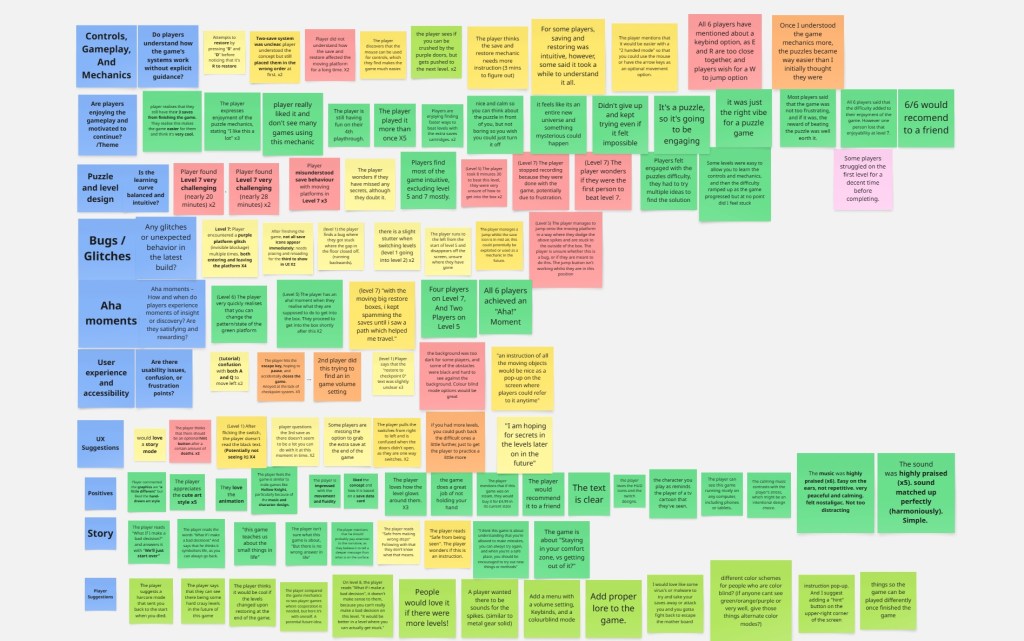
Figure 3: Miro board used to categorise playtest feedback by theme and severity.
● Survey Analysis: I reviewed the survey responses to supplement my video analysis, focusing on both quantitative data (e.g., ratings) and qualitative feedback (e.g., free-text responses), to validate my observations and gain deeper insight into player opinions that they may not have provided in the latter.
Step 5: Compiling My Report
I compiled my findings into a comprehensive UX report (Save Yourself – UX Report), structured around my focus areas, with a severity key to prioritise issues. The report included graphs (e.g., average level completion times) and player quotes to support my observations. I presented the final report to Marcus via Google Slides, and he appreciated the insights, planning to address key issues based on my feedback.
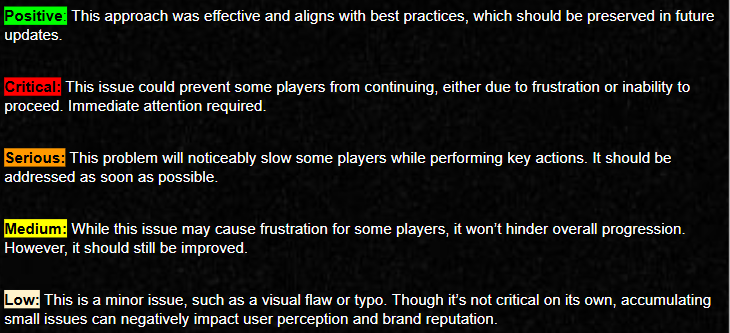
Figure 4: Severity key used to categorise playtest findings for “Save Yourself,” defining Positive, Critical, Serious, Medium, and Low issues
Key Findings from My Playtest
Controls, Gameplay, and Mechanics
● Positive: My playtest revealed that most players found the save-and-restore mechanic intuitive, with mouse-based controls (left/right click) enhancing accessibility. Players praised the mechanic’s novelty, with one noting they were a “huge fan of mechanics that get a little meta” (Save Yourself – UX Report, Page 8).
● Critical: I identified that players struggled significantly with Level 7 due to unclear tutorials on how the save-and-restore mechanic affects platform states, leading to confusion and spamming of the mechanic (Save Yourself – UX Report, Page 18, Figure 4).
● Serious: I noted that the “E” and “R” keys for saving and restoring were too close, causing accidental mix-ups. The lack of keybinding options and alternate controls (e.g., “W” to jump) hindered accessibility (Save Yourself – UX Report, Page 10).
● Medium: My analysis showed there was no way to specify which save cartridge to restore to, leading to unintended restores (Save Yourself – UX Report, Page 12).
Engagement and Pacing
● Positive: My playtest found that five out of six players returned for additional playthroughs, indicating strong replay value. The minimal hand-holding fostered a sense of discovery, and the calm atmosphere supported thoughtful problem-solving without disengagement (Save Yourself – UX Report, Pages 14–15).
● Critical: I observed that while frustration levels were low overall, Level 7’s difficulty spike (average completion time: 10 minutes vs. 2 minutes for Level 6) disrupted pacing for some players
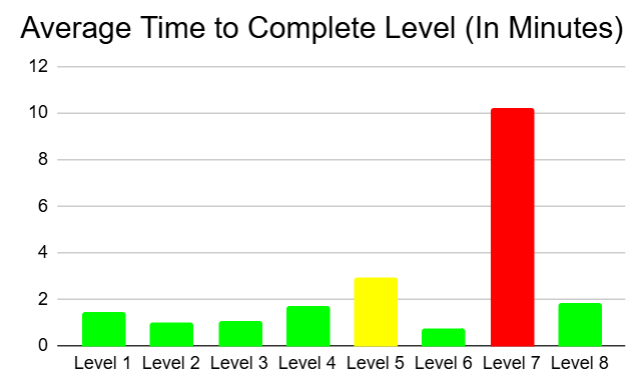
Figure 5: Average level completion times, highlighting Level 7’s difficulty spike (Source: UX Report, Figure 5).
Puzzle and Level Design
● Positive: My findings showed that early levels effectively introduced mechanics, while later levels provided meaningful challenges. All six players felt the difficulty curve enhanced enjoyment (Save Yourself – UX Report, Page 17)
● Critical: I identified Level 7 as a major sticking point due to players’ lack of understanding of platform state changes (Save Yourself, – UX Report, Page 18).
● Medium: My level timing analysis revealed that Level 5 took longer than expected (average: 3 minutes), indicating a potential difficulty spike (Save Yourself – UX Report, Page 19, Figure 5).
“Aha!” Moments
● Positive: My survey confirmed that all six players experienced “Aha!” moments, particularly in Levels 5 and 7, where persistence led to rewarding breakthroughs. One player noted that calming down and simplifying their approach made Level 7 “click” (Save Yourself – UX Report, Pages 21–22, Figure 6).
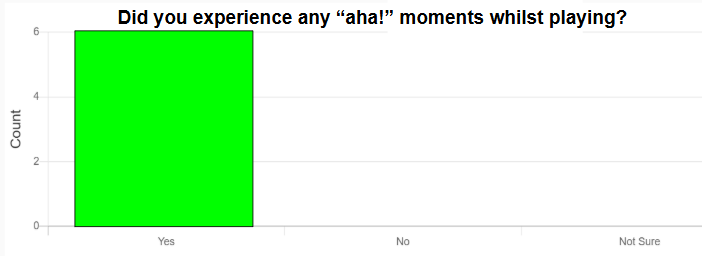
Figure 6: Survey results showing all 6 players experienced “Aha!” moments while playing “Save Yourself
● Observation: I noted that these moments were satisfying but often delayed by unclear mechanics, especially in Level 7.
User Experience and Accessibility
● Critical: I observed that dark backgrounds and black obstacles reduced visibility, impacting accessibility for colourblind players or those with visual impairments (Save Yourself – UX Report, Page 24 Figures 7 & 8).

Figure 7:Gameplay screenshot showing dark backgrounds and black obstacles in “Save Yourself,” reducing visibility for colourblind players
● Critical: My analysis highlighted the lack of a hint system, which left players stuck for extended periods, risking disengagement (Save Yourself – UX Report, Page 25).
● Serious: I found that the absence of a pause menu led to accidental quits via the Esc key, forcing restarts due to no autosave (Save Yourself – UX Report, Page 26)
● Low: My review of the footage showed that confusing text instructions (e.g., mistaking “0” and “D” to restore instead of “R” ) caused brief confusion (Save Yourself – UX Report, Page 28).
Bugs and Technical Feedback
● Medium: I identified invisible wall glitches in Levels 1 and 7 that caused players to get stuck, leading to frustration (Save Yourself – UX Report, Pages 30–31, Figures 13, 14 & 15).
● Medium: I noted a save/restore jump glitch that allowed mid-air saves, which could be exploited or repurposed as a mechanic (Save Yourself – UX Report, Page 32, Figure 16).
● Low: My analysis uncovered minor issues, including running off the map in Level 5, level loading stutters, and a HUD bug with the third save cartridge (Save Yourself – UX Report.pdf, Pages 33–36, Figures 17, 18 & 19).
General Positives
● My playtest revealed that players appreciated the hand-drawn art style, smooth animations, and glowing level effects for their nostalgic and immersive qualities (Save Yourself – UX Report, Page 38).
● I found that the soundtrack and sound effects were well-received for being peaceful and harmonious, with the calming music balancing player stress (Save Yourself – UX Report, Page 39).
● My survey confirmed that all six players would recommend the game to a friend (Save Yourself – UX Report, Page 39).

Figure 8: Survey results showing all 6 players would recommend “Save Yourself” to a friend who likes puzzle games
Story Thoughts
● Despite the minimal story, I noted that players interpreted phrases like “What if I make a bad decision?” as symbolic of life’s choices, reflecting on personal growth and comfort zones (Save Yourself – UX Report, Page 41).
Player Suggestions
● Through my analysis, I gathered suggestions including adding a hardcore mode, more levels, and a settings menu with volume control, custom keybindings, and colorblind modes (Save Yourself – UX Report, Pages 43–44).
● I also documented requests for a hint system, instruction pop-ups, and deeper lore for a dedicated story mode (Save Yourself – UX Report, Pages 43–44).
Recommendations That I Provided
● Improve Tutorials for Mechanics: I recommended adding clearer tutorials for the save-and-restore mechanic’s effect on platform states, especially before Level 7, to reduce confusion.
● Enhance Accessibility: I suggested implementing keybinding options, alternate controls (e.g., “W” to jump), and a colourblind mode to address visibility issues.
● Add a Hint System and Pause Menu: I advised introducing a hint system (e.g., after a set number of deaths) and a pause menu to prevent accidental quits and improve UX.
● Fix Bugs: I prioritised fixing invisible wall glitches and the save/restore jump glitch, suggesting the latter could be repurposed as a feature.
● Balance Level Difficulty: I recommended adjusting Level 7’s difficulty by providing earlier practice with platform state changes and reviewing Level 5’s pacing.
My Reflections and Lessons Learned
Reflecting on my playtest process, I found the experience highly insightful. Using Miro to organise my feedback thematically was a key strength, as it allowed me to visually prioritise issues and structure my report efficiently. My decision to track level completion times in a Google Spreadsheet also proved valuable, as it highlighted critical difficulty spikes like Level 7, which took 8 minutes longer than other levels on average.
One area I would improve is the session length. I set the playtest duration at 25–30 minutes, but some players finished in 10 minutes, while others used the full time. A 15-minute base session with an option to continue would have been more flexible, especially since the extra save cartridge feature in replays provided valuable data on replayability.
I also recognised the need to refine my survey design in future playtests by creating more targeted questions, as some collected data went unused in the report; however, the data obtained either corroborated playtest commentary, or revealed insights that some players overlooked in the recordings.
Additionally, I initially planned to ask live questions during the session, as outlined in my study plan’s “During the Session” table, but I couldn’t implement this due to PlaytestCloud’s lack of support for moderated playtests on PC games as of writing this. In the future, I would adjust my study plan earlier to focus solely on unmoderated methods, ensuring I can gather real-time insights if needed.
Partnering with PlaytestCloud was a smart choice, as it streamlined the recruitment of players who matched Marcus’s target audience, ensuring my feedback was relevant. Overall, this playtest taught me the value of structured analysis and the impact of small design oversights on player experience.
Developer Testimonial
Marcus Jensen, the developer of Save Yourself, shared the following testimonial after receiving my final UX report:
“I met Max Kirby after he commented on my game Save Yourself during a game jam, proposing a structured playtest to help improve it. As I planned to turn the game into something serious, his offer came at the perfect time. We connected on X (formerly Twitter), where Max explained his full process like designing questionnaires based on user experience research. He tailored the playtests to my needs, asking about target demographics, gameplay duration, and key feedback areas. Max handled everything: recruiting 6 testers aged 16–30 on the PlaytestCloud platform, using my latest PC build, and explaining the ‘thinking out loud’ method to playtesters. A few days later, he delivered a detailed PowerPoint report with critical feedback, level-by-level analysis, time data, and links to full playthrough videos with user commentary. His work was exceptional and helped me gain meaningful, objective insights to push the game forward. I feel fortunate to have met Max and am truly grateful for the time and expertise he dedicated to this project.”
— Marcus Jensen, developer of Save Yourself
Conclusion
Through my playtest of “Save Yourself,” I identified a promising puzzle-platformer with strong engagement, replay value, and a unique save-and-restore mechanic. However, my analysis revealed critical areas for improvement, including tutorial clarity, accessibility, and technical bugs.
I provided Marcus Jensen with a detailed UX report based on my findings, and he plans to iterate on the game accordingly. Marcus has also agreed to credit me in the game once he gets back to working on it.
Marcus has agreed to update me on any changes he implements in “Save Yourself,” and I will document these updates in the future if they reflect improvements that I have contributed to through this playtest, ensuring the continued impact of my research is captured.
This case study of my own playtest process highlights the importance of structured playtesting in indie game development and has equipped me with valuable lessons for future playtests, particularly in balancing session design, prioritising player accessibility, and adapting to platform limitations.


 Kirbylife Game Research & Reviews
Leave a comment